Introduction
To capture readers immediately, traditional web accessibility practices often treat alt text as a simple visual description, leaving screen reader users with flat, context-free data that misses the core point of an image. Scribely is changing that narrative by introducing a new framework that pairs on-screen 2D data with off-screen 3D human intent. This deep dive breaks down how combining machine-scraped web data with strategic creative direction closes the digital accessibility gap, helping creators and enterprise teams scale high-utility, WCAG-compliant alt text that preserves brand voice and delivers true equity across the web.
Introduction: What Do We Really Mean by Context?
When learning a new language, context is one of the first concepts we’re taught. If a word isn’t known, or the reader struggles to understand it, the context around it (like the sentence or the situation that’s being described) helps us piece together the meaning. It's the same with alt text: context always comes first, and the words come second.
From WCAG to Purdue, industries have agreed upon a standards-level acknowledgment that alt text's effectiveness depends on purpose and context, not visual description alone. Gathering proper context first is key for writing great alternative text.
Historically, context has been treated as a single, superficial element (e.g., just the copy surrounding an image), leading to generic, repetitive descriptions that miss the core concept of the image’s purpose, like site strategy or brand intent.
At Scribely we're moving alt text beyond flat, one-dimensional context. The strongest alt text balances what's on the screen (2D Context) with the human intent behind the image (3D Context), delivered in a WCAG-compliant, high-utility description. Context is the missing piece of great alt text that's been there all along.
Decoding 2D Context (On-Screen Data)
Let's break down 2D context. Images on a screen are two-dimensional by nature, existing entirely on a flat plane. Think of it like measuring the area and perimeter of an object, but not its volume: you can calculate the size of what’s laid out in front of you, but you're not accounting for any depth beyond that flat surface. It tells you what's there, but not necessarily why.
That flat surface is where 2D context lives: the public, scrapable digital information found directly on a webpage, across a site, or indexed online. This is shown in the visible UI, surrounding copy, spatial placement, and the page's functional goals.
The six forms of 2D on-page data that help you map the topography of the image are:
The 6 Forms of On-Page Context:
- Internal Context (Image Content): Visual elements inside the frame (composition, subject matter, embedded text).
- Local Context (Surrounding Content): Surrounding copy, headers, captions, price tags, and adjacent UI controls.
- Functional Context (Image Function): The operational role of the image (inform, sell, instruct, decorate).
- Spatial Context (Page Purpose): Overarching destination objectives and primary page goals.
- Macro Context (Background & Significance): Broader organizational framing (brand voice, target audience, cultural/historical background).
- Technical Context (Access & Standards): Accessibility mechanics (WCAG rules, character considerations, screen reader behavior).
These 2D, surface-level elements are crucial to our empirical understanding of an image. But 2D context stops short of the why: the business objectives, the curatorial choices, the unspoken strategy behind the image. For that, we need to tap into 3D context — the off-screen truth of it all.
Unlocking 3D Context: The Door to Human Intelligence
3D context is the key that unlocks great alt text. When creators make content, there's a reason behind every image or graphic they choose — a decision shaped by human direction and purpose. 3D context is the human connection that spans the full journey of an image: from the creator who made that image, to the person who chose it, to the writer describing it, to the user reading those words. This human truth is the locked room behind content creation that raw web scraping can't get into on its own.
3D context is a chain of human connection that moves us past what an image is to what it means. 3D context unlocks the full picture, giving us depth, volume, perspective. Without it, even the most complete on-screen 2D data stays incomplete, only describing the door without ever explaining why anyone walked into it.
3D context is off-screen intelligence, strategic direction, and real-world intent. This information exists outside public URLs and in the minds of the people who made the decisions in the first place.
The four layers of 3D context that help you experience different perspectives are:
The 4 Layers of 3D Context:
- The Creator Perspective (Strategy & Purpose): Focuses on artistic intent, mood, visual metaphors, and deliberate focal points selected by designers or creative directors.
- The Client Perspective (Knowledge & Goals): Focuses on internal domain knowledge, spec sheets, archives, subject-matter expertise, and business targets.
- The Writer Perspective (Synthesis & Voice): Focuses on translating visual hierarchy into written prose, synthesizing 2D/3D data, and matching organizational voice.
- The User Perspective (Utility & Intent): Focuses on screen reader user goals, task execution, and delivering practical utility without unnecessary noise.
The Intersection: Where 2D and 3D Meet
When we treat images in isolation and rely exclusively on automated 2D scraping, we get robotic, guesswork-heavy descriptions that only widen the accessibility gap. A description built entirely from what a machine can detect on the page will always be missing the half of the story that never made it onto the page in the first place.
The numbers back this up. 95.9% of the one million homepages evaluated by WebAIM in 2026 had automatically detectable WCAG failures, worse than 2025 and a reversal of six consecutive years of gradual improvement. In WebAIM's own reading, this likely reflects heavier reliance on third-party frameworks and libraries, alongside automated and AI-assisted coding practices. In other words, the more we automate without adding human intelligence back in, the worse the problem gets.
AI can only take us so far when writing alternative text. AI views images as a collection of isolated pixels, not a decision someone made for a reason. It can tell you objective viewpoints, like a person, a product, or a landscape.
What AI can’t tell you is why that image was chosen over a hundred others, what it's meant to accomplish on the page, or how it made the viewer feel upon their initial reaction. We've noticed that the core flaw of standard AI vision models is that they analyze images in a vacuum, disconnected from the web of context that actually gives the image its full meaning.
This is the accessibility gap 3D context closes. By combining 2D data pulled by AI with 3D human context, we can ground the information delivered by AI in factual, intentional truth, turning AI into an effective assistant and deliver truly accessible digital experiences for all.
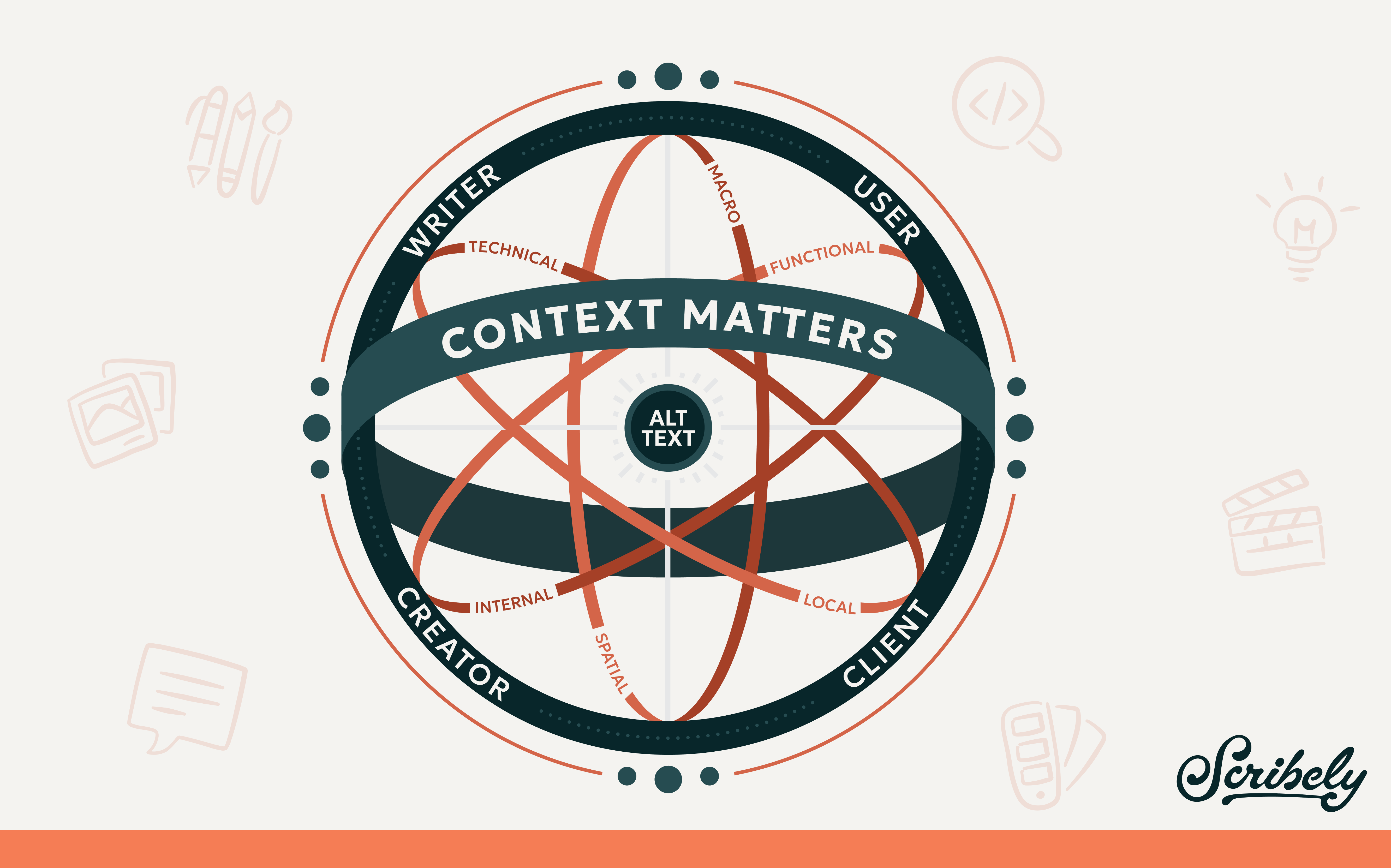
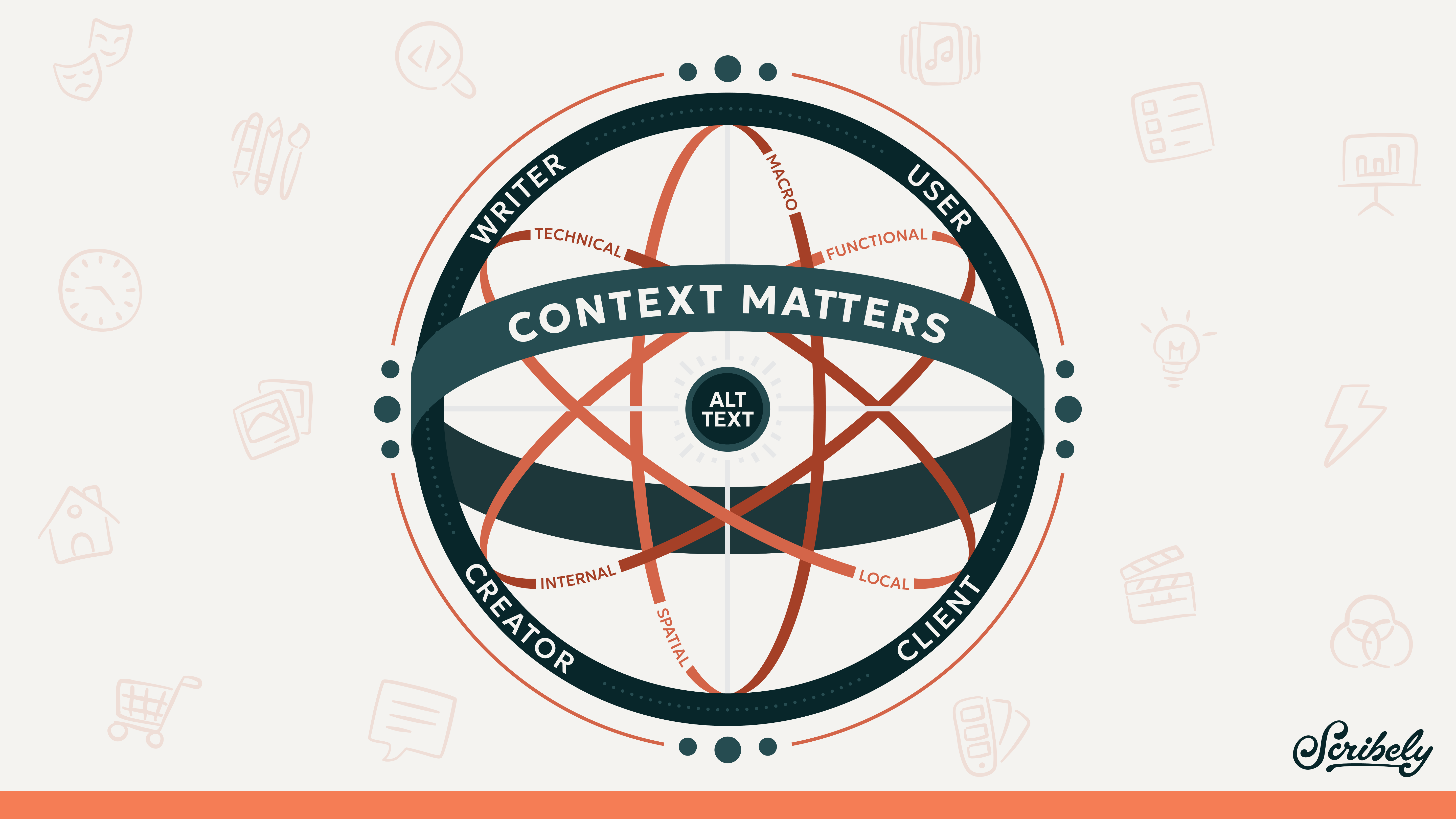
Inspired by an armillary sphere, this diagram shows how Scribely approaches context as a multi-dimensional space
First, at the core, "Alt Text" sits right at the center as the focal point.Next, Inner Rings. Rotating around the core are the six forms of on-screen 2D context: Internal, Local, Spatial, Functional, Macro, and Technical.
Then, an outer ring forms a circle from top to bottom, representing 3D context and the essential humans involved in the process: Client, Creator, Writer, and User. This is the unspoken layer of human intent, depth, humor, and personal meaning that we know is always there, the reason we are creating and reading content on the web in the first place.
Finally, a bold outer band wrapping front to back reads "Context Matters."
Next Steps: Putting Context into Practice
Let's put context into practice. Starting from 2D context, ask yourself: What's inside the frame? What surrounds it on the page? What job is it doing?
After you’ve gathered everything visible on the page or available online, move into 3D considerations.
Remember: 3D context is invisible. This is the unspoken layer of human intent, depth, humor, and personal meaning that we know is always there, even when we can't see it.
3D context requires us to ask deeper questions: What did the creator mean to say by choosing this image? Why this specific image, and not another? Who is it really for?
When writing alt text on your own, for a team, or for an organization, here are some tips to help you get started:
- Writing on Your Own?
- Study context complexity across different image types.
- Pause and map out 2D and 3D context elements before writing a single line of alt text.
- Writing for a Team?
- Build and configure a Custom AI Assistant (e.g., Custom GPT or Google Gem).
- Train the assistant on your specific brand context, spec sheets, and rules—then attach images and prompt for high-quality drafts.
- Writing for an Organization?
- Explore enterprise-level context engineering solutions.
- Implement formal workflows, centralized management, and governance systems to scale context-aware accessibility across entire digital ecosystems.
At Scribely, we’re passionate about creating an equitable internet for all. We've built a Context Engine for Alt Text to help you get started on your context journey. Our Context Engine gives writers and teams a standardized, repeatable workflow for writing alt text, scaling accessibility without sacrificing quality. Users who utilize screen readers can also use our Context Engine, providing them a more interactive, hands-on way to discover content on their own terms.

Image Description
Image Description Goes Here
Check out Scribely's 2024 E-Commerce Report
Gain valuable insights into the state of accessibility for online shoppers and discover untapped potential for your business.
Read the report