
Context engine for alt text
A universe of context, mapped to power your alt text
Answer a few short questions and Scribely builds a Context Analysis Report that shows what each image is really doing — the groundwork good alt text needs.
Existing alt text
alt="Product - Image 3 of 6"
Scribely context
Page context, brand story, product category, technical research, features list, user reactions / questions.
How it works
Five steps from a page URL to a spreadsheet of purpose-fit descriptions.
.svg)
.png)
Image Description
Infographic outlines the five-step process for Scribely’s Context Tool as follows: Step 1, Choose a Pathway, Step 2: Scan & Extract, Step 3: User Input, Step 4: Context Analysis, Step 5: Download Report.
Why alt text matters
Accessibility
A WCAG requirement, and how screen reader users experience your images.
Discoverability
Search engines read alt text to understand and rank your images.
Resilience
Shown when images fail to load, and lowers accessibility risk.
Navigating the 3D context universe
Great alt text doesn't exist in a vacuum. It lives at the center of a multidimensional context universe.
The 2D plane
On the 2D plane, an image is shaped by six surrounding forces: its internal content, local copy, functional job, page placement, macro culture, and technical WCAG standards.
The 3D human plane
But the true breakthrough happens on the 3D human plane. Here, an interconnected web spans from creator to expert setup, from writer to end user.
Scribely has spent years mapping this universe. By understanding the human roles and relationships across this depth, we unlock AI models—training them to perceive, decide, and speak with true human context.
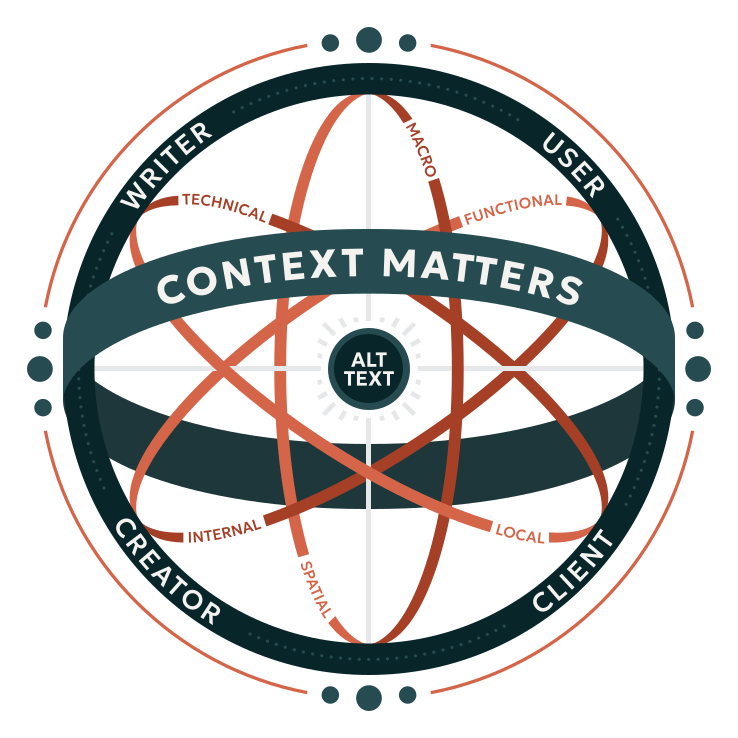
Image Description
Infographic shows Scribely’s 3D approach to context using a spherical diagram with “Alt Text” at the center. Vertical and horizontal lines extend outward from “Alt Text” to support the sphere, which is wrapped in three concentric rings labeled with six forms of 2D context: Macro, Functional, Local, Spatial, Internal, and Technical. A thick outer ring features five forms of 3D human context: Creator, User, Scribely, Writer, and Client.
Good vs. better alt text
eCommerce product
The core difference between the Good and Better examples below is that Good merely lists the visible features, while Better translates how those features actually look and function. Alt text writers must bridge the gap between what the brand displays to SELL the product and what the customer needs to know to BUY it. Every image in an e-commerce gallery exists to provide rich visual information; while context on the page offers helpful cues (like "back welt pockets"), our priority is always to describe why those visual details matter to both the brand and its customers.

Image 1 of 5: three-quarter back view
Good
Three-quarter back product view of full-length trouser-style sweatpants showing the wide-leg drape, thick waistband, back pockets, and floor-skimming hems.
Better
Three-quarter back product view highlights ultra-wide sweatpants, nearly twice the width of the model's thigh, flowing smoothly to the floor and completely concealing the legs. Features include two open back slit pockets with narrow fabric borders, reminiscent of welt pockets, and a floor-length hem that drapes over the sneakers, exposing only the toe in mid-step.

Image 2 of 5: front view
Good
Front product view shows the low-rise fit of the thick waistband that has two front belt loops. The model wears a black and gray crop top, white sneakers, a black tote bag, and silver headphones around their neck.
Better
Front product view highlights the low-rise waistband resting at the top of the hips, a few inches below the belly button. The thick waistband features a distressed, washed finish with six rows of pleated fabric that create a textured, gathered effect. Two front belt loops, clean hems, and smooth fabric through the legs complete the trouser-style look.
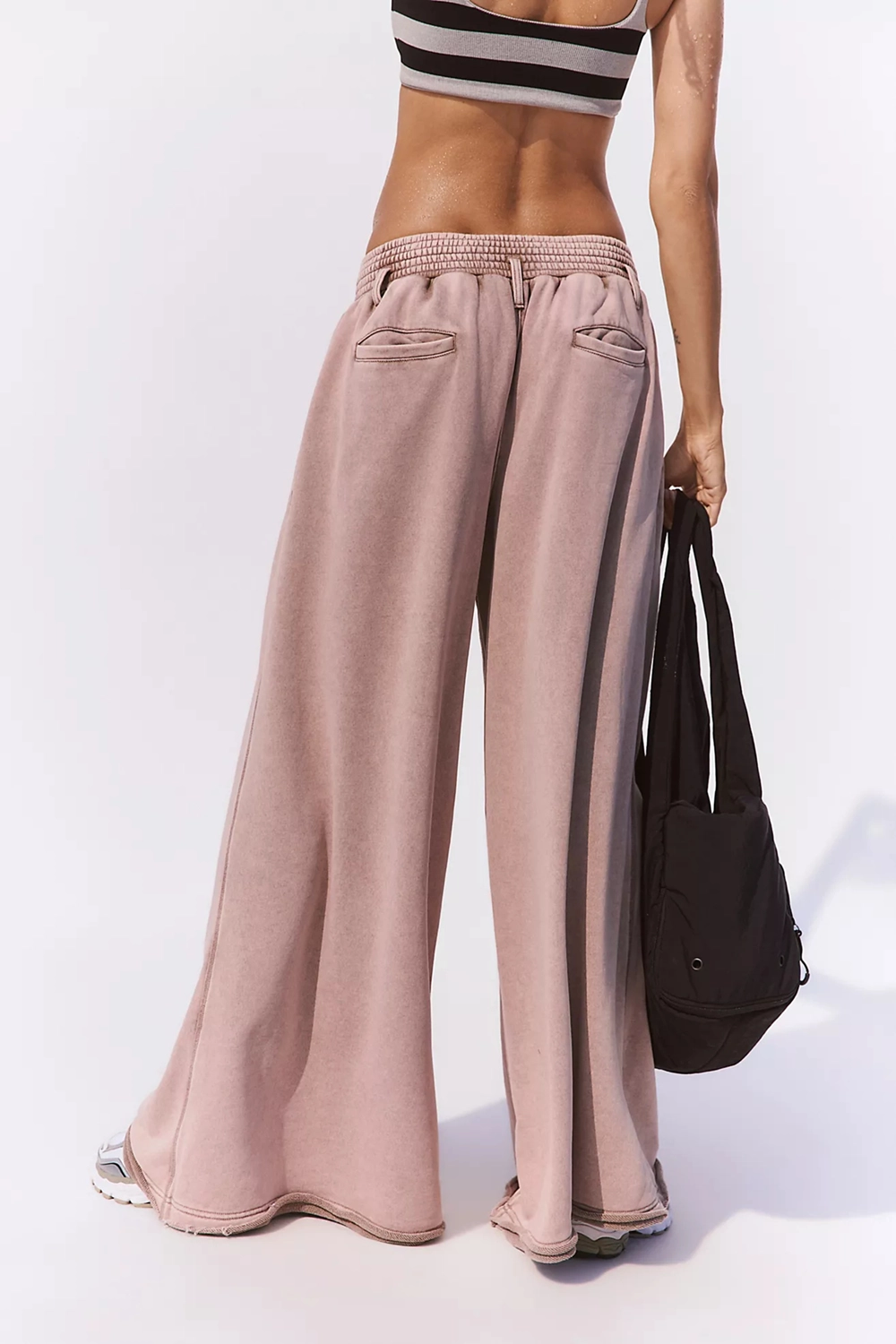
Image 3 of 5: back view
Good
Back product view of the sweatpants showing the pleats along the waistband, rear belt loops, back welt pockets, and distressed hems.
Better
Back product view highlights three loose pleats on either side of the back center seam that create a subtle puckered effect along the bottom edge of the waistband, three belt loops positioned at the hips and spine, and open, unstitched back welt pockets revealing the inner lining. The leg openings have a double-stitched hem with distressed, curling edges along both the inner and outer fabric layers.

Image 4 of 5: three-quarter front view
Good
Three-quarter front product view shows a side pocket along the side seam, a long front pleat on the thigh, and the waistband.
Better
Three-quarter front product view highlights a vertical side pocket with a narrow fabric border, running along the side seam just beneath the waistband. A long front pleat extends down the outer thigh to just below the pocket's bottom edge, laying flat against the thigh. The pants are paired with white and silver sporty-looking sneakers.

Image 5 of 5: styled front view
Good
Front product view of the pants styled on a model wearing a crop top, tote bag, and headphones.
Better
Front product view shows the model posing with one hip raised, causing the long front pleat to drape diagonally across the leg. The subtle front center seam features a narrow folded edge extending from the waistband. The pants are styled with a black and gray striped sports bra with a square neckline, a black tote bag, and silver headphones around the neck.
Museum collection
On a collection page, museums are aiming to SHOW an object so that interested people can STUDY it. While curatorial details on the page provide rich context, they do not label every component. Moving from Good to Better alt text requires research into technical terminology, knowing the difference between a bezel, a port, or a D-pad. Scribely’s contextual research bridges this gap by delivering precise, domain-specific terminology directly to writers, saving time while ensuring accessible, highly accurate descriptions.
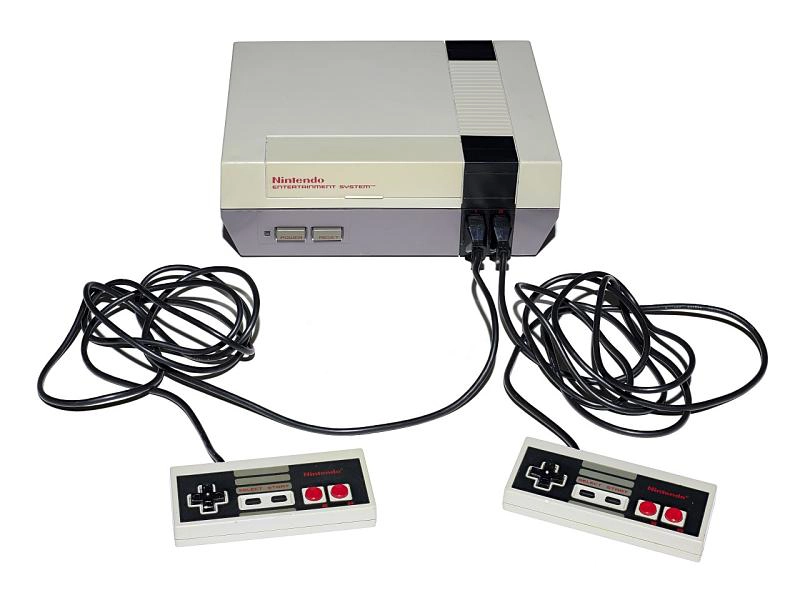
Image 1 of 4: high-angle view
Good
High-angle view of the top of a beige and gray NES console showing the red logo, Power and Reset buttons, and two controllers connected to the console at the front.
Better
High-angle view of the top of the NES front-loading console, featuring a beige upper shell with a front panel that displays a red Nintendo Entertainment System logo. Beneath the logo on the dark-gray lower shell, rectangular Power and Reset buttons sit to the left of a black controller port bezel that contains two black ports. Long coiled black cords lead from here to two light-gray controllers accented with black faceplates and red and black buttons.
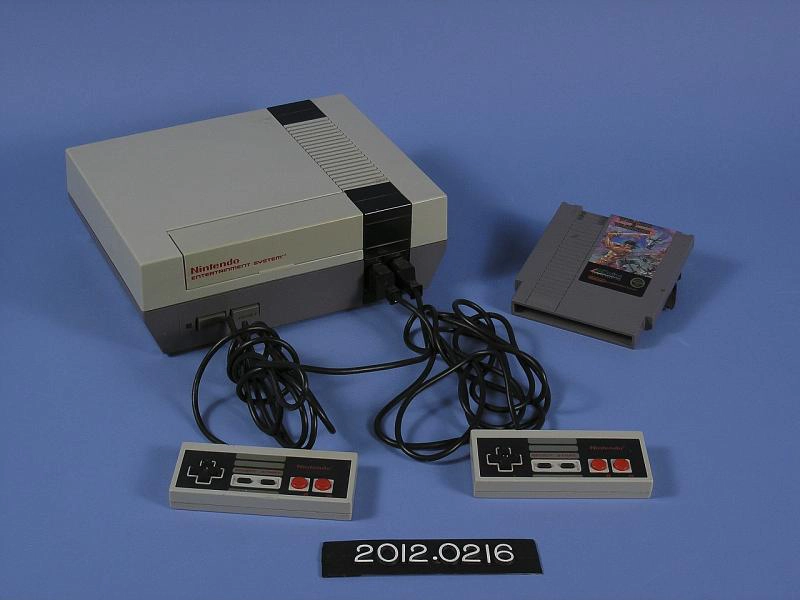
Image 2 of 4: three-quarter overhead view with cartridge
Good
Three-quarter overhead view of the game console, connected controllers, and a Wizards & Warriors game cartridge. Accession number 2012.0216.
Better
Three-quarter overhead view highlights the console's trapezoidal shape angled in at the base. The controller features a black directional pad on the left, two small horizontal oblong Select/Start buttons, and two round, convex red plastic buttons on the far right. Resting nearby, a Wizards & Warriors game cartridge displays vibrant cover art offset to the right of its label, balanced by a dark, textured vertical grip molded into the upper-left plastic. Accession number 2012.0216 is marked below.
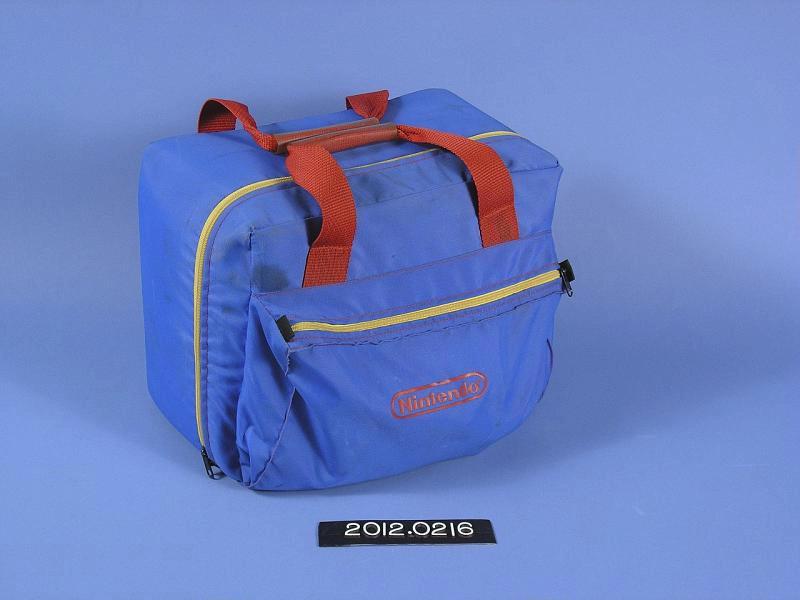
Image 3 of 4: carrying case
Good
Three-quarter overhead view of a blue and yellow Nintendo NES Z-Bag carrying case with red handles and a front zipper pocket. Accession number 2012.0216.
Better
Three-quarter overhead view of the rectangular, soft-sided Nintendo NES Z-Bag carrying case. The bright blue bag features a front compartment secured by a bold yellow top zipper that spans its full width, stamped below with a screen-printed red Nintendo logo. A matching yellow zipper runs up the sides and over the main compartment, while dual red nylon straps join at the top to form carrying handles. Accession number 2012.0216 is marked below.
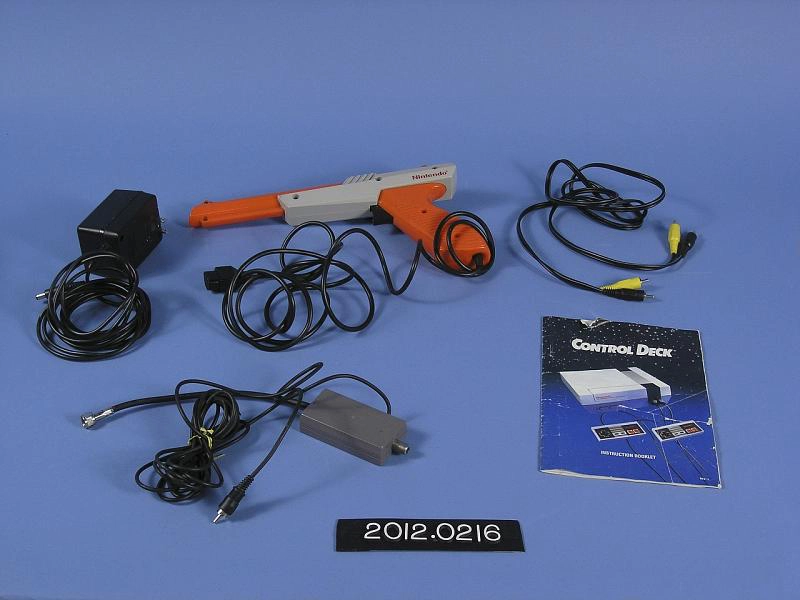
Image 4 of 4: overhead flat lay
Good
Overhead flat lay of five NES Action Set accessories including an AC adapter, a neon-orange plastic Zapper pistol, AV cables, an RF switch box, and an instruction manual.
Better
Overhead flat lay shows five NES Action Set components neatly arranged: an official black AC power adapter brick, a neon-orange and light-gray Zapper pistol, an RCA audio-video cable with yellow and black plugs, an RF switch box with coaxial wiring and a gray rectangular box, and the official Control Deck Instruction Manual displaying cover art depicting the console and dual controllers.
Ready to describe your images?
Run the context tool then reach out to Scribely to schedule a discovery call.