Introduction
In the rapidly evolving landscape of digital accessibility, organizations are increasingly turning to artificial intelligence to automate alt text generation. However, relying solely on off-the-shelf vision models often introduces hidden operational costs and inaccuracies that compromise brand trust. Addressing this challenge requires looking beyond pixels to examine how context and enterprise data integrate into the workflow.
When we released the Scribely Context Engine, we built it to prove a point. We wanted to show that there are better ways to implement alt text at scale, with context at its core. The industry’s default answer has been to point a general-purpose AI model at an image and ask it to describe what it sees. It’s fast, it’s cheap per image, and the market is racing to adopt it.
But general-purpose AI models looking at pixels in isolation have no way of knowing what information to include in the description to accurately inform the user. It doesn’t know that the “slim fit” sweater runs large or that it’s a Merino blend from the fall capsule. It doesn’t know that the 4th-century artifact isn’t just a “brown clay pot,” but an object with a medium, a provenance, a room placement, and a curatorial story.
So the model guesses. And someone on your team has to catch the guesses. The savings you were promised by the AI companies show up on the invoice, but the actual cost shows up somewhere else: in the hours your merchandisers, curators, and brand editors spend correcting a machine’s output instead of doing the real intelligence work you hired them for.
We’re not the only ones seeing it. A global study done by Workday describes an “AI tax” on productivity: roughly 37% of the time employees save with AI is lost to rework, correcting, clarifying, and rewriting low-quality output. That works out to nearly four hours lost for every ten gained. Alt text is no exception.
Hidden Cost of “Human in the Loop”
“Human in the loop” has become the standard safeguard for AI-generated content: the model drafts, and a person reviews before anything goes live. The principle is sound, but we keep watching enterprises fall into the same trap. They invest in off-the-shelf multimodal AI expecting dramatic savings and end up with an operational bottleneck.
Without the right context, the drafts don’t need review — they need rewriting. Skilled staff spend their days fixing hallucinations, stripping out filler, and catching errors, image after image.

We saw this firsthand at Scribely. When our team used AI-generated alt text to describe thousands of GIPHY GIFs, our writers reviewed every draft, and nearly every one needed a rewrite. Some descriptions were simply inaccurate. Others left out information a screen reader user would need. In the worst cases, the model misidentified the people in the image. The time we expected to save went into correction, and the errors that mattered most were the ones that were hardest to spot.
If specialists have to heavily edit every draft, AI hasn’t made the workflow more efficient. It has moved the labor downstream to your most expensive people, and added the fatigue of hunting for mistakes in text that deceptively sounds correct.
Steve McGarvey, a principal UX designer and digital accessibility leader, told the WSJ that AI gets accessibility wrong more often than people realize. “I can’t count the number of times that I’ve sought a solution for a problem, asked an LLM, and it gave me a solution to an accessibility problem that was completely wrong,” he said. Without judgment or discernment in your field, he continued, you could “really do harm to a consumer base—or do harm within a team—just by assuming” that whatever an LLM says is factual.
Adopting a mindset of relying on humans in the loop to check everything an AI generates is not the pathway to better quality. Instead, we need to shift toward an "AI in the loop" approach—being intentional about where AI fits into the workflow and staying firmly in the driver's seat by designing systems that yield a far stronger first draft.
Risk, Trust, and Cultural Fidelity: Why Accuracy Isn't Optional
For an enterprise brand or cultural institution, inaccurate alt text is a brand safety risk and a threat to institutional credibility, which has seen an erosion of public trust in institutions over the past two decades.
Meeting WCAG is only the floor. An automated audit can tell you that alt text exists, but not whether it’s right or effective, so a wrong description sails through the same check as a good one.
What matters is whether the people who rely on your descriptions can trust them. Trust takes years to build and one visible error to lose.
Case Study in Brand and Cultural Risk
Consider Odilon Redon’s charcoal drawing The Eye, Like a Strange Balloon, Mounts Toward Infinity.

Off-the-Shelf Vision AI:
"A sepia-toned charcoal sketch depicts a strange, ring-shaped balloon floating above a dark, barren landscape. Fine radiating lines surround its form, creating an eerie, surreal atmosphere against the muted, textured sky."
Description by Scribely:
"A hot air balloon floats over a low horizon line in this charcoal drawing on tan-colored paper. The bulk of the balloon is a human eye fringed with lashes and looking up. Where the basket would be below the balloon is a tray-like form holding a head. Blended and smudged charcoal gives the drawing a hazy look."
The worst part of this description is that the model never recognized the eye as the central visual truth of the drawing. It saw a “ring-shaped balloon,” turned the lashes into “radiating lines,” and missed the head in the basket entirely. With so little of the actual image captured, it filled the space with feeling instead, using words like “eerie” and “surreal.” Atmosphere should inform a good description so the user can discern it rather than being told how to interpret an image.
The same failure can happen on a product page, where a sweater described as “slim fit” that actually runs large becomes a return, a complaint, and a customer who trusts your site a little less. Ungrounded AI erases artistic intent in a museum and misleads shoppers in a store, and in both cases, the credibility it damages is yours.
The Real Culprit: Alt Text Is a Data Integration Problem
The Redon description wasn’t a writing failure. Rather, the AI model had nothing to work with except pixels on a screen. So do we need more creative writers or better prompts? Neither. The model needs the information that already exists in your databases.

In large enterprises, what it takes to describe an image accurately is already on record. It's just not always somewhere the model can reach. Crucial specs, dimensions, and selling points live isolated in enterprise resource planning (ERP) systems, product information management (PIM) systems, and digital asset management (DAM) systems. Provenance, medium notes, and curatorial context are trapped in collections databases and internal spreadsheets.
Different systems hold different pieces, none of them talk to each other, and the model sees only the image file.
That’s why you can’t prompt your way out of this. A prompt can’t give your alt text a fact it never receives. The hard part is the plumbing: field names may not match across systems, records are often incomplete or duplicated, and the same asset is likely to be identified differently in each place.
Workday’s latest research on The Copy/Paste Economy shows how common this is. Of the 6,100 professionals it surveyed across HR, Finance, IT, and Operations, 82% said they spend significant time coordinating across teams, moving data between tools, and reconciling conflicting reports. One in five employees lose more than seven hours a week to it, which is roughly a full workday every week, all spent on work that software is supposed to do. Your asset data is stuck in the same copy-and-paste economy, and a model can’t reconcile a disconnected system.
Scribely makes those connections. We clean, map, and reconnect your asset data so every description starts from what your systems already know. It’s where human expertise belongs: at the beginning, building the pipeline from the jump.
Scribely’s Free Context Engine as a Public Proof-of-Concept
The Context Engine is a free, public prototype of our methodology. It reads an image through two layers of context, from 2D context to 3D context, and separates what matters for a description from the digital noise around it.
We built it to produce a structured Context Report, a diagnostic rather than an alt text generator. The report organizes everything known about an image into three parts:
- Basic Details: the facts of record for the asset, such as title, maker or product, date, materials, dimensions, credit line, and catalog or SKU number.
- 2D Context (On-Screen Data): digital context that exists publicly on the web, whether it appears on the page itself, elsewhere on the site, or anywhere the internet has indexed it. It’s organized into five layers:
- Local: the copy, headers, captions, and interface components directly around the image.
- Macro: the broader strategy behind the asset, including brand identity, audience, and cultural history.
- Spatial: where the image sits on the page, its visual hierarchy, and its relationship to neighboring elements.
- Functional: what the image is there to do, whether it’s to guide the user’s next action or its role in the page, such as an overview or a detail shot.
- Technical: the code and standards behind the asset, including accessibility attributes, WCAG requirements, and industry best practices for describing it.
- 3D Context (Off-Screen Intelligence): human insight that can’t be scraped from the web, including contributions made directly by artists, editors, brand teams, product designers, alt text writers, and screen reader users. The report preserves those inputs and answers the questions your team submits.
Where the report has no evidence, it says so instead of guessing. It will state that a source doesn’t establish a link or that no 3D input has been provided, so the gaps are visible before anyone writes a word.
Why Our Context Engine Is a Diagnostic, Not An Alt Text Generator
A button that returns instant alt text would have been easy to build. We chose not to, because a “generate” button would have recreated the problem we set out to solve: a model guesses, and a person cleans up after it. Jumping straight to writing a description skips the step that matters most, which is finding out what context you have and what’s missing.
The Context Engine makes that visible. Run it on one of your own pages. You'll see what your systems already know about an image and what they never passed along. You may also be surprised at some of the connections it makes. Then a human expert or an AI agent can start with the facts instead of a guess. With the right context, the first draft is the one worth keeping.
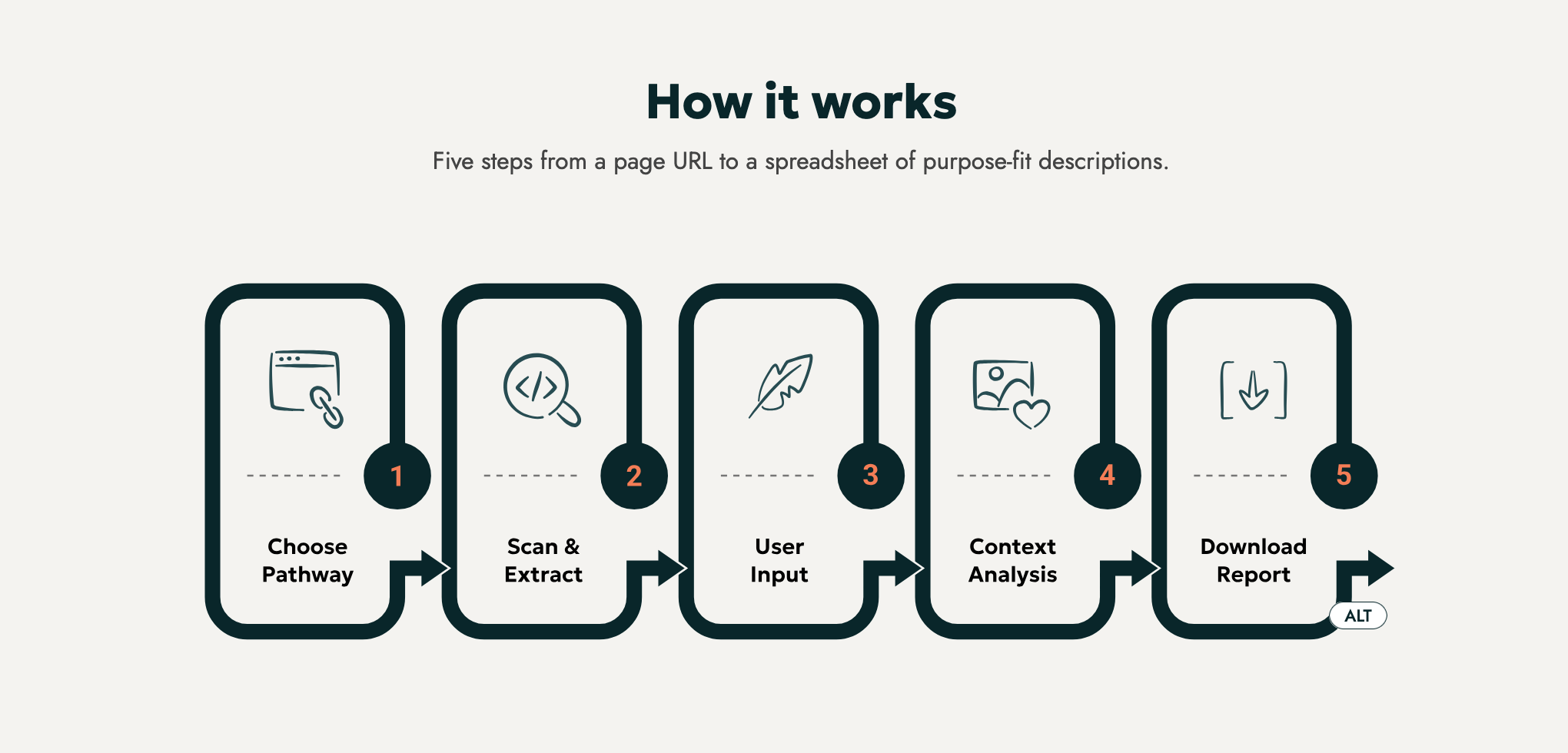
The free tool is deliberately a diagnosis, not a cure. It shows you where your context lives and where it breaks. Fixing that, and training a description model on your own data that you own and control, is the work that follows.
Scaling to 50,000+ Assets and Creating Custom, Client-Owned Models
Analyzing one page in a browser is valuable. In a few minutes, you can see what context surrounds an image, what a good description would draw on, and where your own information runs out. It’s a concrete way to test our approach on a page you already know.
But one page is a sample, not a solution. Resolving an uncaptioned backlog of tens of thousands of SKUs or collection items takes total enterprise plumbing. To scale accessibility across your catalog, Scribely steps in to bridge your broken asset pipelines and help you build and own custom, brand-safe description models.
Standardizing the Experience with Hero + Delta
At that scale, consistency matters as much as accuracy. Whether someone is navigating an eCommerce carousel or a multi-view sculpture, our systems standardize how images relate to one another with a Hero + Delta framework.
- The Hero image establishes the full baseline description.
- Each Delta image relies on the Hero and focuses strictly on what’s new, such as a specific material, update, or angle, without repeating baseline facts.
The outcome is streamlined, fatigue-free navigation for screen reader users and consistent, scalable authoring rules for your teams.
Building Assets to Last Through Collaborative Calibration
We don’t drop black-box software onto your stack and walk away. We work directly with your internal teams to QA outputs, calibrate context inputs, and tune domain-specific agents. The long-term value is that we help your organization build, refine, and own a proprietary, brand-aligned model tailored to your exact catalog, taxonomy, and voice.
Fixing Your Data Management At Its Source
The future of accessible digital content isn’t bigger prompts aimed at raw pixels. It’s organized data, paired with deliberate context engineering. The information that makes a description accurate already lives inside your organization, and the work is connecting it to the image.
See an interactive sample of our methodology on your own content. Run a single URL through our free Context Engine and get a Context Report showing what your page already tells a model, and what it leaves out.
Your catalog already holds what a good description needs. Let’s connect it. Talk to Scribely today about uniting your disconnected asset data and building a custom alt text engine that’s yours to own.
Image Description
Image Description Goes Here
Check out Scribely's Alt Text Checker
Scribey's free resource, the Alt Text Checker, provides a quick and easy way to extract the alt text on a webpage.
Try the Alt Text Checker