Audio Description Part 2: Hearing the Visual Arts

A look at how visual mediums, such as film, television, theater, and galleries, are slowly offering new ways for people with disabilities to access their art.

Caroline Desrosiers

Founder & CEO

May 28, 2020

7 minutes

Six dancers wearing all black pose in a tightly knit group in front of a concrete wall under a blue sky.
Image Description
Image Description Goes Here
ALT

Introduction

Let’s talk about representation. We live in an exhilarating time where many creators and brands are celebrating inclusivity and diversity. What a wonderful opportunity to shine a light on accessibility!

Previously on Audio Description...

  • Audio Description is mutually beneficial for content creators, accessibility users and users who do not have a disability, such as commuters and multi-taskers.
  • Auditory mediums like Podcasts and Audiobooks are great sources for inspiration when crafting Audio Description.
  • Adding a human touch to Audio Description, such as dynamic speech and personality, improves the user experience for the listener.
  • Audio Description must be provided for all visual elements that cannot be accessed in an alternative format (e.g., text, audio). This ensures equal access and participation for people with visual impairments.

“All Access” Must Include Access for All

Let’s talk about representation. We live in an exhilarating time where many creators and brands are celebrating inclusivity and diversity. What a wonderful opportunity to shine a light on accessibility!

Visual Mediums, such as film, TV, theater and galleries, are slowly increasing their authentic representation of people with disabilities. In a November 2019 report, it was revealed that the number of TV series regulars with disabilities has risen to 3.1% from 2018’s 2.1%. Actors with disabilities cast in those roles is now up 20% from 5% in 2016.

This upward trend of disability representation is promising, however several of these programs are still inaccessible to people with visually impairments. There’s a very simple solution – Audio Description!

Because everybody should be able to binge the next hottest show

It seems like every week there’s a new binge-worthy show that people are gushing about. Sadly, many people are excluded from enjoying the new hit show simply because they do not have the means to access it.

This has defined the experience for people with visual impairments since the introduction of film and television. We’ve been watching TV since the late 1920s but the SAP feature for TV became available decades later in the 1980s. SAP, or Second Audio Program, provides narration for the visually impaired. For the most part, SAP was only available for primetime TV. Even though the FCC expanded SAP’s programming in 2016, the feature is only available on 9 networks and is still quite limited.

Apps and streaming services like Netflix and Hulu have since disrupted the film and television industry and become a popular way to watch content. But did these streaming services also take the necessary steps to provide accessible formats? Unfortunately, not as quickly as we hoped. Audio Description in the streaming world has only been available since Netflix popularized it in 2015 (and only after they faced a lawsuit).

Hulu was extremely late to the party. In October 2018, they reached a settlement with the American Council of the Blind and the Bay State Council of the Blind to improve the accessibility of their service for people with visual disabilities. At that point, they were not providing any content with Audio Description. There’s been some improvement since 2018, but Audio Description is still not available for every program – and sometimes only for select seasons.

As for other streaming and apps, it’s been hit or miss. Amazon Prime, Apple TV and Disney+ have only recently committed to providing Audio Description. HBO’s app is behind as well. Regrettably, there is no law stating that streaming or cable services must provide Audio Description. Therefore, the choice is left up to the individual companies. And unfortunately, it usually takes a lawsuit (like Netflix’s) for a company to finally commit to including accessible features. Here is a full list of content streaming services with Audio Description.

With the growing demand for movies and television series, competition for ratings and viewership is fierce. Streaming services that prioritize accessibility will increase their potential audience. According to the World Health Organization, about 285 million people in the world have a visual impairment, 39 million of which are blind. That’s a significant population of potential viewers. Furthermore, Audio Description provides more options for viewers looking to multi-task (and catch up on Season 3 of “Ozark” before somebody spoils it).

I Wanna Be Where the People Are. Movies, Live Shows and Art Galleries!

Live events provide even more roadblocks for Audio Description. Fortunately, many of these formats have become more accessible in recent years. The only problem? Audio Description is not as widely available as we would like it to be. People with visual impairments are an integral part of every community and, therefore, deserve to have access to a multitude of options for their patronage.
Audio Description is an art in and of itself! Describers must intrinsically understand how to tell stories and how audiences experience them. It is critical to capture the nuances and visual cues and the describer must be succinct to get the full story across quickly and keep pace with the flow.

Let’s go to the movies!

For film, Audio Description is a relatively new technology. Starting only as recently as 1988, film production companies provided an audio described version of their movies when the VHS or DVD was released. This was obviously not an adequate solution because people with visual impairments would have to wait months to see the latest films.

Going digital has helped. Digital files allow production companies to streamline the process of adding accessible elements. Audio Descriptions can now be encoded into the digital file -- also more cost effective! Prior to this, it was around $12,000 to install the Audio Description technology. This limited the selection of available showtimes at movie theaters.

Now, viewers can attend virtually any showtime and use an accessibility device. Companies like Sony invented Closed Captioning Glasses and Audio Description Devices that are now available in many movie theaters. Regal was the first company to implement these changes, followed by Cinemark, Alamo Drafthouse and AMC. Unfortunately, these helpful devices are still not available in every theater (even though it became a requirement in 2018). Luckily, it’s as simple as searching Fandango to see if there are Audio Description capabilities at the theater.

As for older movies? There is a giant backlog of films that do not yet have Audio Description (a great opportunity for a budding screenwriter!).

In a World of Pure Imagination

For live shows or concerts, the venue must employ an audio describer to communicate via earpiece. It is essential for the description to be live because anything can happen during a live show!

Unfortunately, smaller venues may not have the budget or technology for this and will potentially miss out on patrons with visual impairments. A simple remedy? Hire an audio describer that can sit next to the patron and narrate the show live. Another alternative is to allow the patron to sit in on a dress rehearsal or run-through so that a stage manager or director’s assistant can describe the action.

Several organizations like Deaf West Theatre incorporate ASL into the staging of their shows so that it is a part of the entire process. We hope that future companies will find a way to make Audio Description an intrinsic part of the process.

Curating an Accessible World

Audio guides for galleries and museums have been around for a while. Luckily, it was a logical step on the path to developing Audio Description devices. There is a powerful feeling that is experienced simply when standing in a gallery or museum. For that reason, Audio Description often isn’t enough to truly experience an installation. That’s why some galleries and museums, like the Smithsonian and the National Gallery of Prague, went the extra mile to include sensory or tactile tours to enhance the experience.

With COVID restrictions, many galleries and museums are offering virtual tours and online exhibits. Shockingly, many do not have Audio Description! This is a missed opportunity. If museums and galleries make the move to create virtual experiences, they must also prioritize the necessary accessibility features so everyone can enjoy them. Furthermore, it expands the global reach of that curation’s cultural significance. Many people are unable to travel to the world’s vast spread of museums and galleries. Therefore, this is a perfect chance to share the knowledge and beauty with an audience base that would have otherwise been unable to access it.

In Conclusion:

Everyone should be able to access art in its full glory and at its peak moment of relevance. Advancements in Audio Description technology have opened the door to audience members with visual impairments. With the expansion of our virtual world, we have an opportunity to ensure that people with disabilities will never again be excluded from experiencing the arts.

Next Time in our final series on Audio Description:

  • How to make comedy news punchlines accessible
  • How Audio Description is useful for all types of learners
  • Who else can benefit from Audio Description?

Check out Part 3 of this Audio Description series.

Interested in learning more about how the experts at Scribely can help you meet your accessibility goals? Contact us today for more information!

Aerial view of a person using a credit card to make a purchase on an e-commerce product page. Their open laptop is resting on a wooden surface next to a pink pencil holder and Apple magic mouse.
Image Description
Image Description Goes Here
ALT

Check out Scribely's 2024 eCommerce Report

Gain valuable insights into the state of accessibility for online shoppers and discover untapped potential for your business.

Read the Report

Cite this Post

If you found this guide helpful, feel free to share it with your team or link back to this page to help others understand the importance of website accessibility.
Table of Contents

Scribely's Alt Text Checker

With Scribely's Alt Text Checker, you can drop a URL and scan for common alt text issues. Download a report and get organized on next steps to making your images accessible.

Free Scan

Related Articles

A complex digital network of glowing blue interconnected dots and lines against a deep black background.

Image Description

Image Description Goes Here

ALT
A woman with long, reddish-brown hair and bangs speaks into a microphone. She is wearing a black top and a prominent necklace with large, emerald-green stones. Her right hand holds the microphone, and her left hand is partially visible, gesturing as she speaks. The background is a blurred indoor setting with neutral tones.

Image Description

Image Description Goes Here

ALT
A close-up, low-angle shot of a stack of magazines standing upright, viewed from the spines. The pages’ ends are rough and textured, with a mix of light and dark brown tones. In the background, the colorful and varied covers of the magazines are visible but blurred.

Image Description

Image Description Goes Here

ALT
Alice pulls back a curtain with one hand while clutching a skeleton key with the other. She wears a dress with short, puffed sleeves and a flaring, calf-length skirt under an apron. Her hair hangs loosely around her shoulders as she leans forward to look at a knee-high door revealed by the curtain.

Image Description

Image Description Goes Here

ALT
Abstract digital artwork of geometric shapes with warm orange, blue, and pink tones, creating a layered, architectural concept with sharp angles and overlapping surfaces.

Image Description

Image Description Goes Here

ALT
A black and white isometric illustration depicting a centralized digital network. In the center, a large platform supports an orb representing an AI or neural network with smaller orbs connected. This central hub is connected by lines to various floating user interface windows. Four people stand at the smaller orbs using laptops to interact with the technology to illustrate an interconnected workflow.

Image Description

Image Description Goes Here

ALT
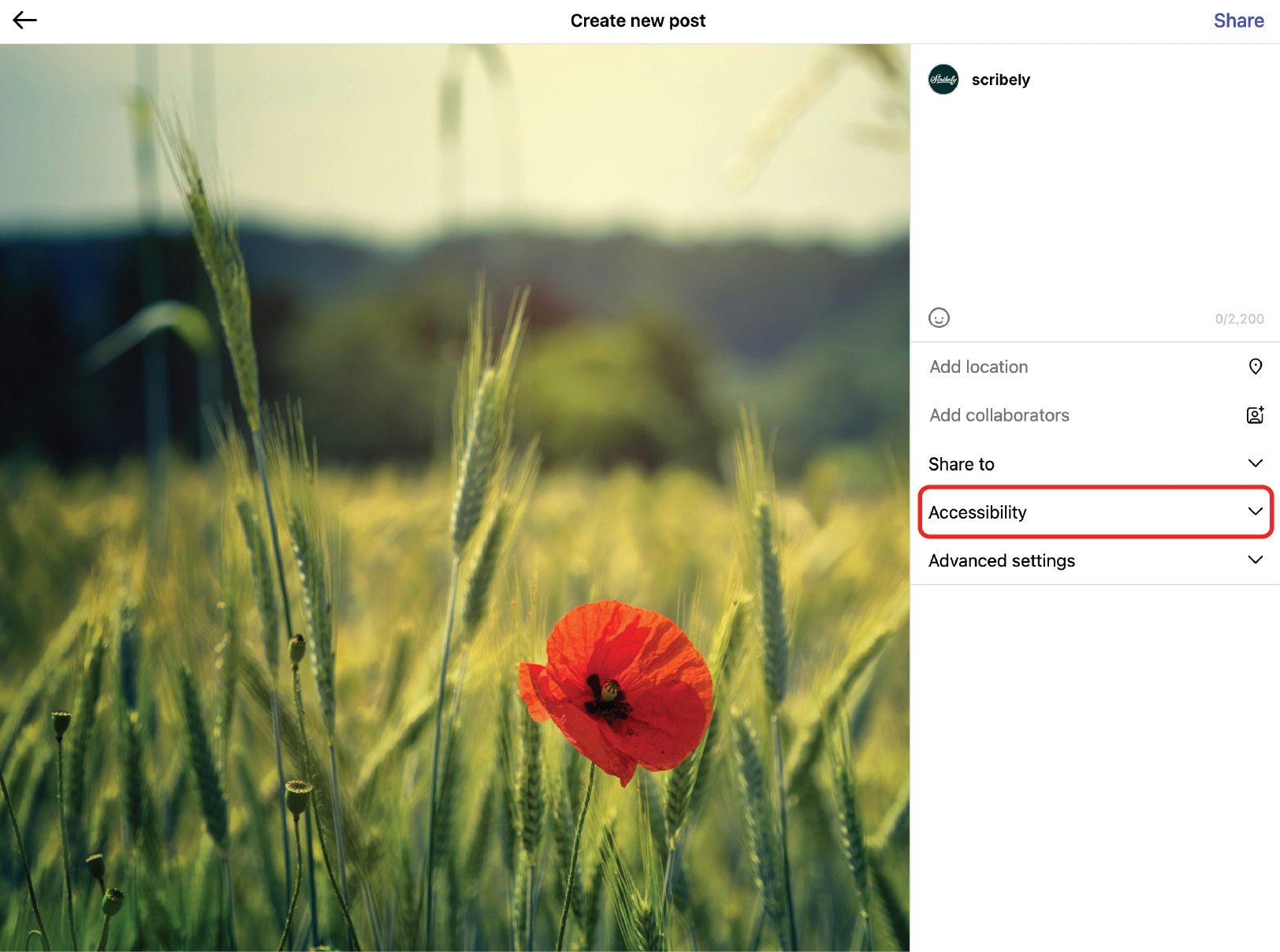
A screenshot of the Instagram "Create new post" screen. On the left, there is a preview of an image featuring a single, vibrant red poppy in a sunlit field of green and yellow wheat. On the right, under the post settings, the "Accessibility" menu is highlighted with a red rectangle, showing the user where to find the option to add alt text.

Image Description

Image Description Goes Here

ALT
A minimalist photograph shows three white, Scrabble-like tiles that spell the word 'ALT.' The tiles are perfectly centered against a solid coral-colored background.

Image Description

Image Description Goes Here

ALT
Collage of 4 photos of the disability rights movement featuring the 504 Sit-in, Disability Independence Day, the 0 Busters at Gallaudet, and the Capitol Crawl.

Image Description

Image Description Goes Here

ALT
The Met Gala 2025 steps featuring deep blue carpet with golden daffodils scattered throughout the scene. Title on image reads, "The Top 10 Looks from Met Gala 2025 with Accessible Image Descriptions."

Image Description

Image Description Goes Here

ALT
Cluttered workspace with open books filled with interior design and architecture images, a pair of black-rimmed glasses, crumpled pieces of paper, notebooks, and a laptop.

Image Description

Image Description Goes Here

ALT
Person points at colorful charts and graphs displayed on a laptop screen, analyzing data in a collaborative work setting with a colleague across the table writing in a notepad.

Image Description

Image Description Goes Here

ALT
A hand holds a white digital stylus, poised over a tablet screen, ready to draw or write. Colorful computer monitors and a keyboard fill the blurred background.

Image Description

Image Description Goes Here

ALT
Overhead view of two people sorting through a collection of abstract art prints laid out before them on a surface. They both point at a piece featuring a dark square with simple white line drawings.

Image Description

Image Description Goes Here

ALT
A freshly sharpened yellow pencil lies on lined paper, surrounded by scattered shavings and graphite dust.

Image Description

Image Description Goes Here

ALT
Hand holds a marker to an easel pad showing a hand-draw visualization of an image workflow that includes a user interface, database, and website creation.

Image Description

Image Description Goes Here

ALT
Person sits in a dimly lit room staring blankly into the light of their smartphone screen, head falling towards the couch like they're drained of energy.

Image Description

Image Description Goes Here

ALT
Closeup of a smart phone fixed to a tripod recording a man with short braids and a floral shirt. He sits in front of a low beige sofa as he smiles and points at the camera.

Image Description

Image Description Goes Here

ALT
First person view of a person holding a smartphone and swiping social media with a blurred view of a photo gallery on a Mac behind it.

Image Description

Image Description Goes Here

ALT
Several dusty and disintegrating framed portraits piled atop one another in an empty, run-down space.

Image Description

Image Description Goes Here

ALT
Media
April 19, 2022

Why NFTs Need Alt Text Now

Three people wearing pink smile together as they look at a smartphone screen. The phone has a bright pink case. One person with long pink hair and another with short brown hair laugh.

Image Description

Image Description Goes Here

ALT
Laptop screen with an image of Vimeo's logo next to YouTube's logo. Vimeo's video player user interface is at the bottom of the screen. Text below reads, "Vimeo and YouTube are letting us down." Scribely decorative squiggles separate the laptop from headphones and audio wave icons. Scribely logo in the bottom right corner.

Image Description

Image Description Goes Here

ALT
Person on the far side of a computer screen with their head buried in both hands under an icon for an accessibility overlay.

Image Description

Image Description Goes Here

ALT
Grid of four GIF screenshots featuring four Disabled women doing various reactions with white caption text on each screenshot like “Spill the tea, girl” and “That’s hot.”

Image Description

Image Description Goes Here

ALT
Close up of a person opening a journal at a wood table. They hold a pen in one hand, and a pot of tea and a mug sit in front of the journal.

Image Description

Image Description Goes Here

ALT
The Met Gala 2024 steps draped in a cream-to-seafoam-green ombré carpet, bordered by lush white blooms and topiary greenery. Title on image reads, "The Top 10 Looks from Met Gala 2024 with Accessible Image Descriptions."

Image Description

Image Description Goes Here

ALT
Screenshot of Scribely’s Alt Text Checker. Text reads “Identify alt text issues on your website. Enter your URL below, and Scribely’s Alt Text Checker will scan your webpage for alt text issues and suggest next steps for improvement.” above a fillable field with “Enter your URL” to the left and an Analyze button to the right.

Image Description

Image Description Goes Here

ALT
Front of a digital camera resting on a tripod with a small fuzzy microphone attached to the top via a red cord with a blurred building in the background.

Image Description

Image Description Goes Here

ALT
Resources
April 3, 2023

How to Make Video Accessible

GIPHY logo in all capital, block letters and the cursive Scribely logo, both in white text against a violet-purple background.

Image Description

Image Description Goes Here

ALT
Glimpsed between two open, silver laptops, a person points at a screen as a slightly smaller pair of hands of a younger person rest near the keyboard.

Image Description

Image Description Goes Here

ALT
Blue flag with a ring of 12 yellow stars printed on a 100 Euro bill, which overlaps an American the D of an American dollar bill.

Image Description

Image Description Goes Here

ALT
Resources
September 1, 2024

European Accessibility Act (EAA)

Graphic. Text below an illustration of an open laptop reads, “A Visual Description & Accessibility Glossary” in white text against a sage-green background. The cursive Scribely logo is in the bottom right corner.

Image Description

Image Description Goes Here

ALT
View down onto an open, silver laptop as a person with long red fingernails touches the built-in mousepad. They hold a green credit card in the other hand.

Image Description

Image Description Goes Here

ALT
Woman throws both arms up as she smiles widely, her eyes closed amid a shower of glittering confetti. She wears a teal-green, velvety jacket.

Image Description

Image Description Goes Here

ALT
Person against wood paneling holds one arm across her body to cup the opposite elbow. She holds that second hand to her chin and index finger on her jawline. She looks up, head tipped to the left and smiling.

Image Description

Image Description Goes Here

ALT
Person facing away from us works at a computer with a wide screen. The person wears headphones, and a laptop sits next to a lamp on the desk.

Image Description

Image Description Goes Here

ALT
Pincers at the end of a robotic arm hold a dark pink Gerbera daisy against a sky-blue background.

Image Description

Image Description Goes Here

ALT
Two different hands reach towards one another, nearly touching, as if they are about to shake hands.

Image Description

Image Description Goes Here

ALT
Resources
August 12, 2020

A Guide to Inclusive Language

Person with shaggy, chin-length hair sits with their back to us as they look at a computer screen. They wear headphones and a black and white plaid shirt.

Image Description

Image Description Goes Here

ALT
Accessibility
November 19, 2020

Talking Images: A Screen Reader Revolution

Two smiling people sit on the ground on either side of a low coffee table. Studio-style microphones are set up in front of each person, and one of them touches the mousepad of a laptop.

Image Description

Image Description Goes Here

ALT
Six dancers wearing all black pose in a tightly knit group in front of a concrete wall under a blue sky.

Image Description

Image Description Goes Here

ALT
Person smiles as they move toward us, listening to their device with earphones with a white wire. Out of focus, others walk along the city street in the background.

Image Description

Image Description Goes Here

ALT
Smiling person captured mid-jump in front of white aluminum siding. The person’s long hair floats up as they tuck their heels close to their hands, which are down by their sides.

Image Description

Image Description Goes Here

ALT
Dozens of people facing away from us gather in a courtyard or square. Two people in the middle of the crowd bow their heads and lift their right fists high.

Image Description

Image Description Goes Here

ALT
Person sitting, folded up in a shopping cart. Out of focus, they rest one elbow on the edge of the cart and rest their forehead in that hand. A text box reads, “2023 E-Commerce Content Accessibility Report.” The cursive Scribely logo is above.

Image Description

Image Description Goes Here

ALT
Dancer strikes a pose resting on one hand and one foot, their hips lifted. Their other hand and leg cross over their body. They are on a brick walkway leading to Voorhees Town Center.

Image Description

Image Description Goes Here

ALT

Ready to get started?

Turn intentions into actions, start here!